


Shared link preview
When someone shares your platform’s link on WhatsApp, on Slack or on a social network, the app automatically builds a preview card with three elements: a title, a description and an image. A well-configured preview presents your brand even before the person opens the link.
This is how the card appears in a WhatsApp conversation:
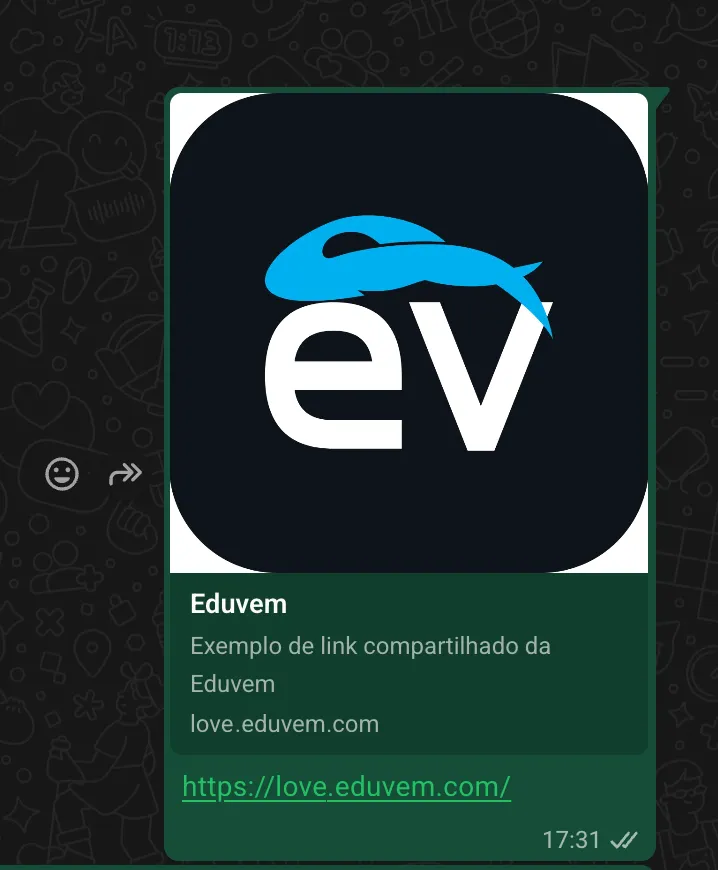
Where to configure each element
Section titled “Where to configure each element”The preview is configured on two tabs of the institution administration:
| Element | Where to configure it | Recommendations |
|---|---|---|
| Link preview title | Configuration tab | Your platform’s name or a short tagline. WhatsApp usually truncates the title at around 60 characters. |
| Link preview description | Configuration tab | A short sentence describing the institution. WhatsApp usually truncates the description at around 110 characters. |
| Link preview image | Images tab | PNG or JPG. Recommended size: 1200x630 pixels. |
All three fields are optional: when they are not filled in, the preview uses the platform’s default information.

The image lives on the Images tab
Section titled “The image lives on the Images tab”Unlike the title and the description, the preview’s custom image is not on the Configuration tab: upload the file in the Link preview image field, on the institution’s Images tab. Use an image in the 1200x630 pixel format so that it appears whole, without cropping, in messaging apps and on social networks.

Changed it and the preview did not update?
Section titled “Changed it and the preview did not update?”Messaging apps keep a link’s preview for a while. After changing the title, description or image, a link that was already shared before may keep showing the old preview for a few hours or days - that is the behavior of the apps themselves, not a configuration error. To check the result right away, share the link in a new conversation or use the sharing debug tool of the social network in question.