


Integration API webhooks
A webhook is an automatic notice Eduvem sends to another system the moment something happens - with no need for that system to keep asking “so, did anything change?” With webhooks, when a Participant completes a piece of Content or receives a certificate, Eduvem “pushes” that information right away to the address your integration team provides (HR, a BI tool, an internal system).
It’s the “real-time” alternative to polling: instead of your system asking every so often what changed, Eduvem tells you on its own the moment it changes.
Who this feature is for
Section titled “Who this feature is for”Setting up webhooks involves two people with different roles:
- The institution administrator (you) releases the permission on an API token. That’s what this article covers.
- Your integration team (whoever writes the code) uses that token to register the addresses that will receive the notices and to handle each notice received. That technical part is in the API documentation.
Releasing webhook permission on a token
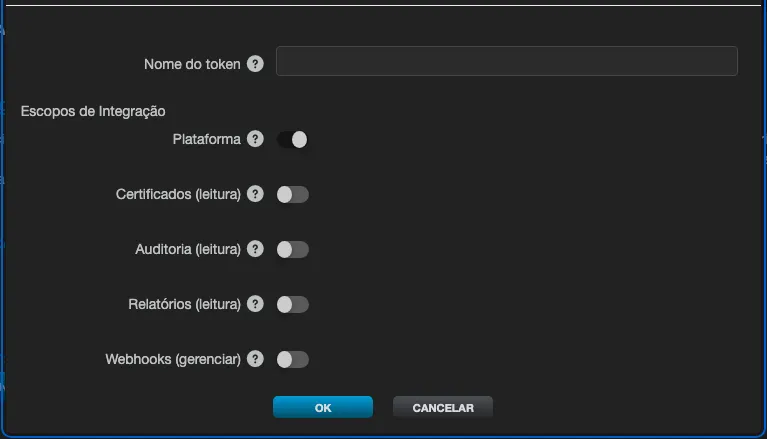
Section titled “Releasing webhook permission on a token”Webhooks are managed with the same API tokens used by the rest of the integration - there is no separate credential. The ability to manage webhooks sits behind a specific permission, which comes off by default: webhooks:manage.
- In the admin panel, open the institution’s Integrations tab.
- Create a new API token (see Integration API tokens). A token’s permissions are set at creation and cannot be changed afterwards: to give webhooks to an integration that already has a token, create a new token with the permission and replace the old one.
- In the token’s list of permissions (scopes), check Webhooks (manage).
- Confirm with OK and copy the token value shown - it will not be displayed again.
A token without that permission that tries to manage webhooks gets an access refusal. Granting a token permission to read participants and enrollments does not, by itself, grant webhook permission - it needs to be checked explicitly. As always, grant a token only what the integration actually uses.
What the notices carry (overview)
Section titled “What the notices carry (overview)”Each notice is a signed notification, sent to the address your team registers, reporting the event (for example, “enrollment completed” or “certificate issued”) and the related data: the enrollment, the class, the content and the participant. Everything is isolated per institution - a notice only carries data for the institution that owns the token.
Sending the CPF inside the notice follows your institution’s profile configuration: if the CPF field isn’t enabled in the profile, it isn’t sent.
Technical details live in the API documentation
Section titled “Technical details live in the API documentation”Registering the addresses that receive the notices, the full event catalog, verifying the security signature, the retry policy and monitoring deliveries are all done by the integration team and are described in the API documentation. Forward that material to whoever will code the integration.