


Creating users by username
Besides registration by email and by CPF, Eduvem lets you register and authenticate participants by a freely chosen username - useful when the institution identifies people by enrollment number, employee code or another identifier of its own, including for companies (such as a CNPJ).
How it works
Section titled “How it works”- In the participant registration wizard, check Register with Username - the option is exclusive with registration by email and by CPF, and applies to all three tabs (individual, multiple and CSV).
- The username accepts letters, digits, period (
.) and underscore (_), with at least 4 characters. Numeric-only values are accepted (e.g.20261234). - If you type a valid CPF with punctuation (e.g.
111.444.777-35), the platform stores only the digits (11144477735). This is intentional: the login screen strips the punctuation before sending, so a username stored with periods could never sign in. The participant can type the login either way. - The participant’s initial password is the username itself. On first access, they are required to change it - unless the institution has disabled password changes by the participant (the Allow password change option), in which case the username remains as a fixed password.
- Creation is also available through an integration (
POST /api/integrations/users,usernamefield).
Registering a participant by username
Section titled “Registering a participant by username”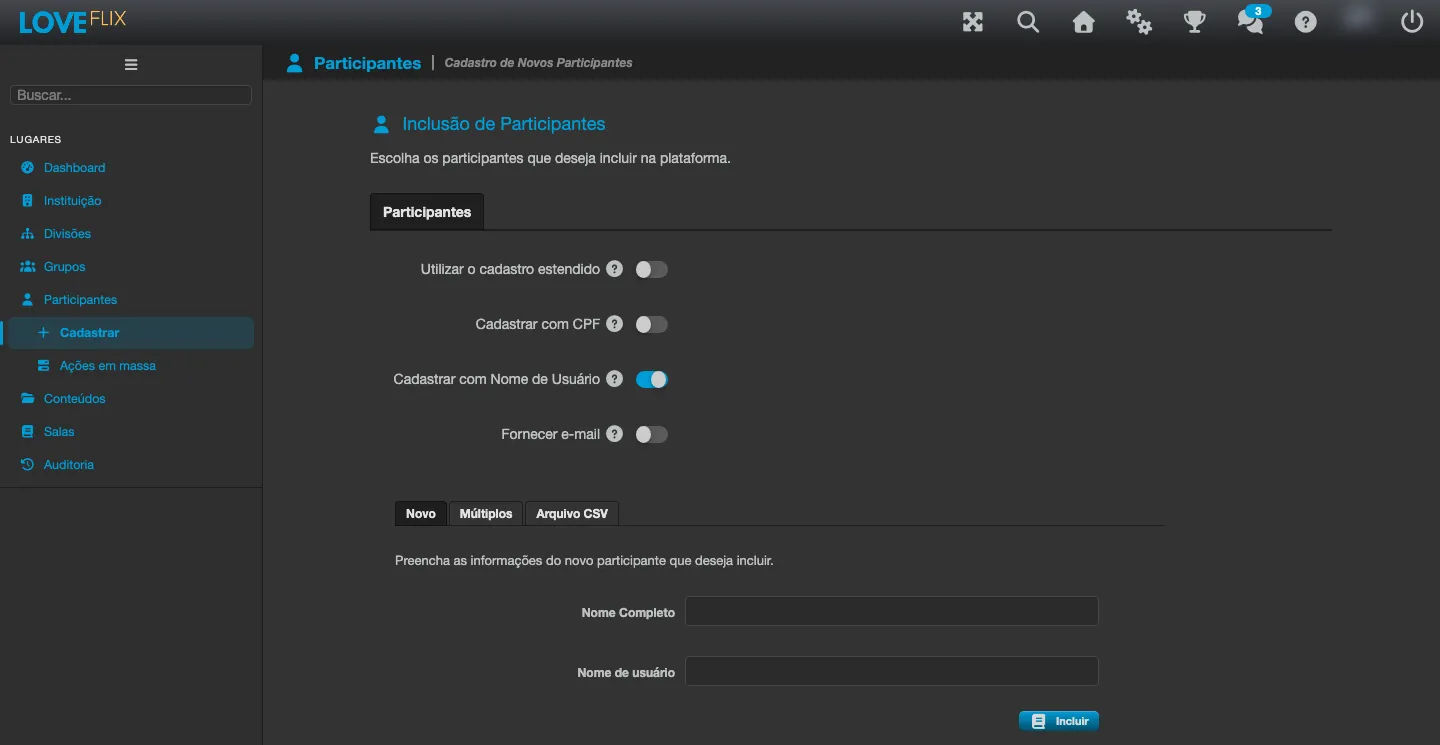
- Under Participants, click Register.
- Check Register with Username.
- Enter the participant’s full name and username (New tab), or several lines in the format
username;full name(Multiple and CSV File tabs). - Enroll them in the desired classes and finish.
Best practices
Section titled “Best practices”- Standardize with the data source (academic system, HR/ERP): the username is a unique key within the institution.
- For large volumes, use the wizard’s CSV File tab or the integrations API.