


NR certificates: place, modality and instructor
Brazil’s workplace safety Regulatory Standards (NRs) require a training certificate to state where it took place, how it was delivered (in person, blended, or distance learning), and the name and qualification of the responsible instructor. Eduvem can require these four fields before releasing the certificate for a class marked as an NR certificate.
How it works
Section titled “How it works”Once the feature is enabled for the institution, every class gets the NR certificate option. A class marked with it only issues its certificate once the four NR fields are filled in:
- Place
- Modality (In person, Blended, or Distance learning)
- Instructor name
- Instructor qualification (for example, a professional registration number)
Classes not marked as an NR certificate are not affected by any of this. And even on a marked class, the participant’s completion is never blocked - only the certificate PDF is withheld while a field is missing, and it is released automatically as soon as the information is filled in.
Setting a default on the content
Section titled “Setting a default on the content”When editing a piece of content, the certificate section gains three fields: Modality, Instructor name, and Instructor qualification. Each value is used on the certificate of any class of that content that doesn’t override the field - so this is the most practical place to configure an instructor or a modality that repeats across several classes. These fields appear when the institution has the Allow NR certificates option or when the content allows distribution - so a content producer can leave the default ready for the institutions that receive it.
Marking a class as an NR certificate
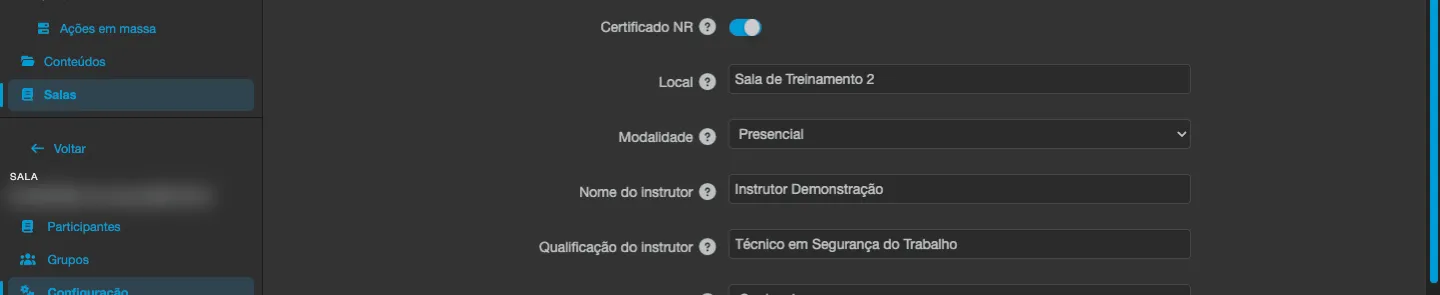
Section titled “Marking a class as an NR certificate”In the class’s configuration, checking the NR certificate option reveals the four fields:
- Place - can only be filled in on the class itself; it has no content-level default.
- Modality, Instructor name, and Instructor qualification - can be left blank (or on “use content default”, for modality) to inherit the value set on the content.
The platform only allows checking the class once all four fields resolve, whether from the class’s own value or from the content’s default. If one is still missing, the class shows a message naming exactly which field needs to be filled in.
Tracking gaps from the institution
Section titled “Tracking gaps from the institution”In the institution’s menu, the NR readiness section (in the General group) lists every active class marked as an NR certificate that still has pending fields, with the columns:
- Class
- Content
- Missing fields
- Withheld certificates - how many already-completed certificates for that class are withheld pending the information.

When there is nothing pending, the section shows that every active marked class already has the required fields and that certificates issue normally.
In the institution’s configuration, a line labelled NR readiness sums up the situation - for example, “2 class(es) with pending fields - see list” - with a link to that section.
Filling in a class’s (or its content’s) pending fields releases the withheld certificates automatically, with no further action needed.
Where the information appears on the certificate
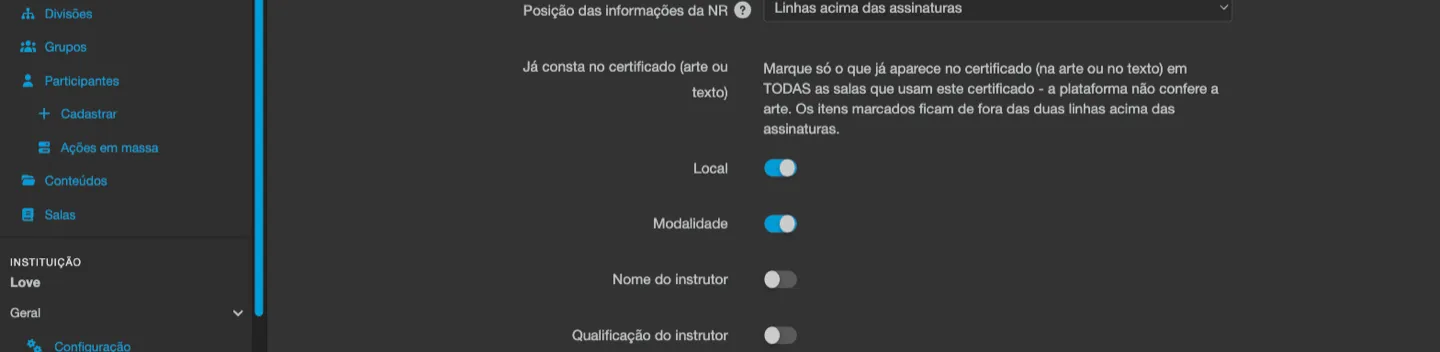
Section titled “Where the information appears on the certificate”With the feature enabled, the certificate settings of a class marked as an NR certificate, of content that has such a class, and of certificate templates gain the NR information position option, with three choices:
- Own page “Informações do treinamento - NR” (default) - an extra page at the end of the certificate, without the background artwork, listing place, modality, instructor and instructor qualification. It does not depend on the artwork’s layout and fits long qualifications. This page always prints complete.
- Lines above the signatures - two centred lines between the completion text and the signatures, keeping the certificate on a single page. Only available on models other than Default (for example Advanced): on the Default model the artwork already carries the signatures, so this choice is not shown.
- Do not print (the data is already on the certificate) - the platform prints nothing from the NR. It is available on every model, including Default, where only the own page and this choice are offered.
Nothing is skipped automatically: the platform prints exactly what you choose here, even if the certificate text uses NR fields.
When the position is Lines above the signatures (and the model is not Default), four checkboxes appear under Already on the certificate (artwork or text): Place, Modality, Instructor name and Instructor qualification. Each ticked item is no longer printed in the lines above the signatures; the others still are. If all are ticked, no line is printed. The checkboxes do not affect the own page, which always prints complete.
If the institution uses a certificate template, the template text can also carry this data: Insert field offers Training place (NR), Training modality (NR), Instructor name (NR) and Instructor qualification (NR). Using these fields in the text does not turn off the position chosen above: to avoid repeating the data, choose Do not print or tick the items under Already on the certificate. On a class that is not an NR certificate, these fields are empty.

What the participant sees
Section titled “What the participant sees”While a field is still missing, a participant trying to view or download the certificate on a marked class gets a notice explaining what’s missing - for example, “Your NR certificate cannot be issued yet: the institution still has to provide the place of this class. Please try again later.” There’s a variant of the message for each field (place, modality, instructor name, and instructor qualification).
As soon as the institution fills in the information, the certificate is generated normally on the next attempt - the participant doesn’t need to do anything besides trying again. If the class is part of a learning track, the track’s certificate stays withheld while any of its step certificates is too.
Certificates already issued
Section titled “Certificates already issued”Turning on the feature and marking classes as NR certificates doesn’t affect certificates already issued before that - they stay exactly as they were. The NR fields only appear on certificates for participants who complete the content after the institution enabled the feature and marked the class.
Require in-person NR-35 training
Section titled “Require in-person NR-35 training”For NR-35 (work at height) content, the institution can turn on the Require in-person NR-35 training setting, right below Allow NR certificates. When on, the class only certifies the participant after 480 minutes of in-person attendance confirmed by the instructor in the roll calls of their own class; until then the certification card shows Awaiting in-person stage and the minutes already confirmed. The certificate shows the confirmed in-person minutes as its workload and In person as its modality. The setting is turned on by the Eduvem team, on request, and requires Roll call to be enabled and every NR-35 content to be classified (NR certificates do not need to be on). Details in Roll call.
Common questions
Section titled “Common questions”Is this the same as NR certificates with dual digital signature? No. They’re two independent features. This one ensures the certificate carries the place, modality, and instructor required for NR certificates. NR certificates with dual signature additionally require the participant’s electronic signature and a technical responsible’s digital signature before the certificate is released. A class can use both at once, or just one of them.
My institution doesn’t see the “Allow NR certificates” option. How do I ask for it? Contact Eduvem support.
Does this show up on the expiring-certificates export? Yes - the expiring certificates spreadsheet includes columns with each certificate’s place, modality, instructor, and instructor qualification, when filled in.
See also
Section titled “See also”- NR certificates with dual digital signature - the participant’s electronic signature and the technical responsible’s digital signature.
- Certificate validity and recertification - validity period per content, and the expiring-certificates export.
- Online customization and issuance of certificates
- NR pack and NR readiness - the institution’s readiness list and the pack that turns on the NR features.