


Blocked dates (holidays and recess)
Blocked dates are the institution’s calendar of holidays and recess days. A new recurring series of live classes skips these dates automatically and moves the class to the next day in its schedule, so the series keeps the number of classes you asked for.
Where to configure it
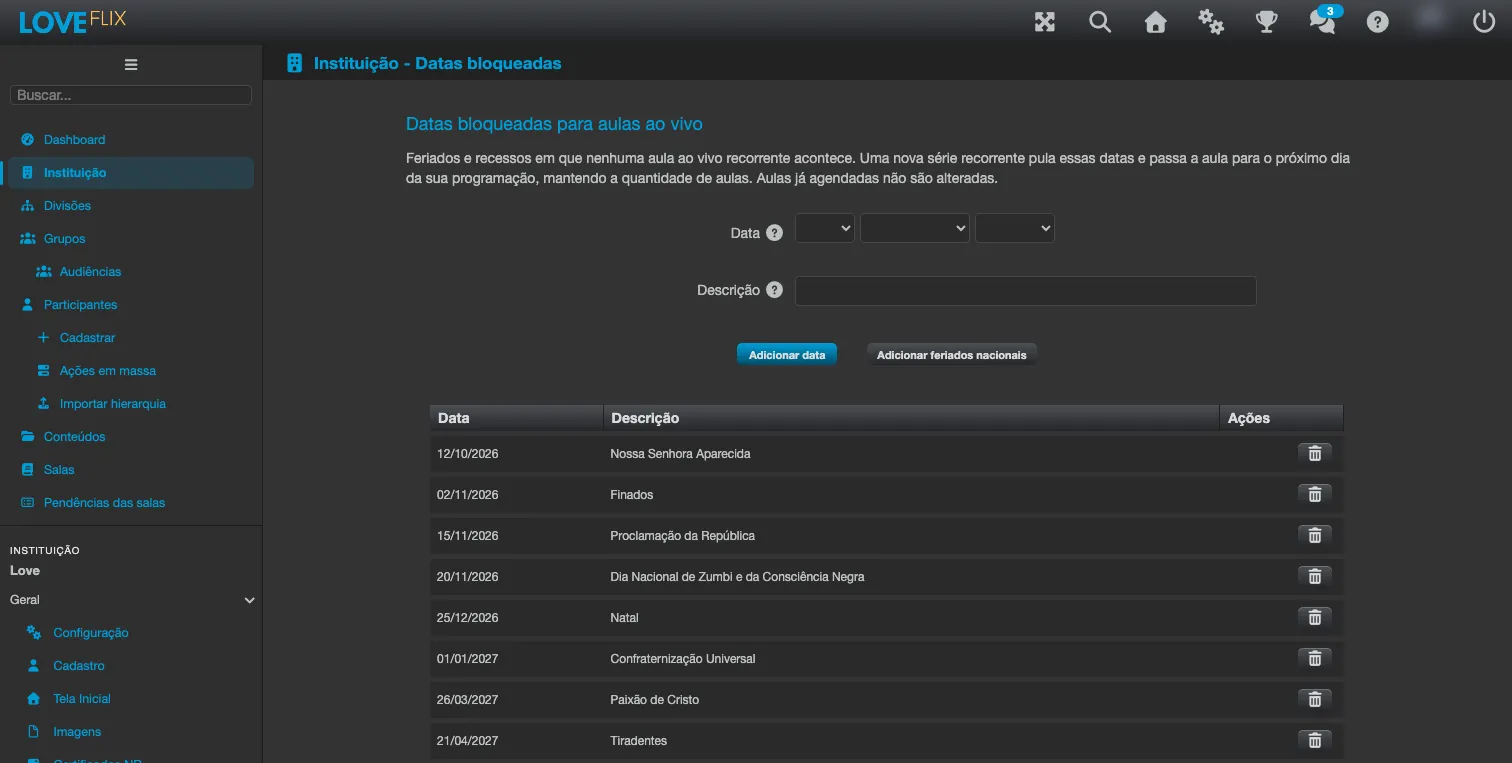
Section titled “Where to configure it”In the institution’s admin panel, in the Engagement group, open Blocked dates (right after Live Classes).
Adding dates
Section titled “Adding dates”- In Date, pick a day on which no recurring live class should be scheduled.
- In Description, optionally write the reason - it is shown next to the date, for example: Christmas.
- Click Add date. The date joins the list below, with the Date and Description columns.
- Repeat for each holiday or recess day. To take a date off the list, use the row’s Remove button.
- Click Save. The message Blocked dates saved. confirms it.
The whole list is saved at once: added and removed dates only take effect after Save. The Clear button discards what you have not saved yet and reloads the saved list.
Two messages can appear when adding: Choose a date., when the Date field is empty, and This date is already on the list., when the date was already added.
National holidays in one click
Section titled “National holidays in one click”Institutions in the São Paulo time zone (GMT-03:00 - America/Sao_Paulo under Identity and brand) also see the Add national holidays button, next to Add date. It puts Brazil’s national holidays from today through the end of next year on the list: Confraternização Universal, Paixão de Cristo, Tiradentes, Dia do Trabalho, Independência do Brasil, Nossa Senhora Aparecida, Finados, Proclamação da República, Dia Nacional de Zumbi e da Consciência Negra and Natal (the official Portuguese names are used as descriptions).
- Carnaval and Corpus Christi are not included, because they are optional days off (ponto facultativo), not national holidays. If the institution holds no classes on them, add them with Add date.
- State and city holidays are also added by hand.
- Dates already on the list stay as they are, with the description you entered.
- Like any added date, the holidays are only stored after Save. If all of them are already on the list, the message The national holidays through the end of next year are already on the list. tells you nothing changed.
Both tables on the screen are always in date order.
What happens to a new recurring series
Section titled “What happens to a new recurring series”When you schedule a series in Live classes > Schedule live class with Recurring series turned on:
- Every occurrence that would fall on a blocked date is skipped, and the series continues on the next day in its schedule. The Number of occurrences you entered is kept: the series ends later instead of having fewer classes.
- Before the series is created, the window shows the actual dates that will be scheduled, under Dates:, and, when it applies, which dates were skipped and why (with the description you registered). Review the dates and click OK again to schedule the series.
- If you change any field after seeing the dates, the window recalculates them and asks for a new confirmation.
If too many blocked dates fall on the series’ schedule to complete all of its occurrences, scheduling is refused with the message Too many blocked dates fall on this series’ schedule to generate all of its occurrences. Remove some blocked dates or reduce the occurrence count.
Single live classes (without Recurring series) are not affected by blocked dates.
Classes already scheduled do not change on their own
Section titled “Classes already scheduled do not change on their own”Blocking a date does not change series that already exist. So that nothing slips through, the Scheduled live classes on blocked dates section, on the same screen, lists the future classes of recurring series that fall on a blocked date, with the Class, Date and Time columns.
For each class that should not take place, click Cancel class and confirm. Cancelling works just like in the class’s Live classes tab: the meeting is removed for all participants and the class is shown as cancelled. Classes that should take place anyway can simply stay on the list.
When no class falls on a blocked date, the section shows No scheduled live class falls on a blocked date.
Common questions
Section titled “Common questions”Does a blocked date apply to every class? Yes. The list belongs to the institution and applies to new recurring series in all classes.
I added a holiday after creating the series. Was that day’s class rescheduled? No. Existing series are not changed; the class appears under Scheduled live classes on blocked dates so you can decide whether to cancel it.
Does the recurring series keep the same number of classes? Yes. Each skipped date is made up on the next day in the series’ schedule.