


Setting up the home page
The home page is your institution’s showcase: what the participant finds when they sign in. It is configured on the Home Screen tab of the institution settings.
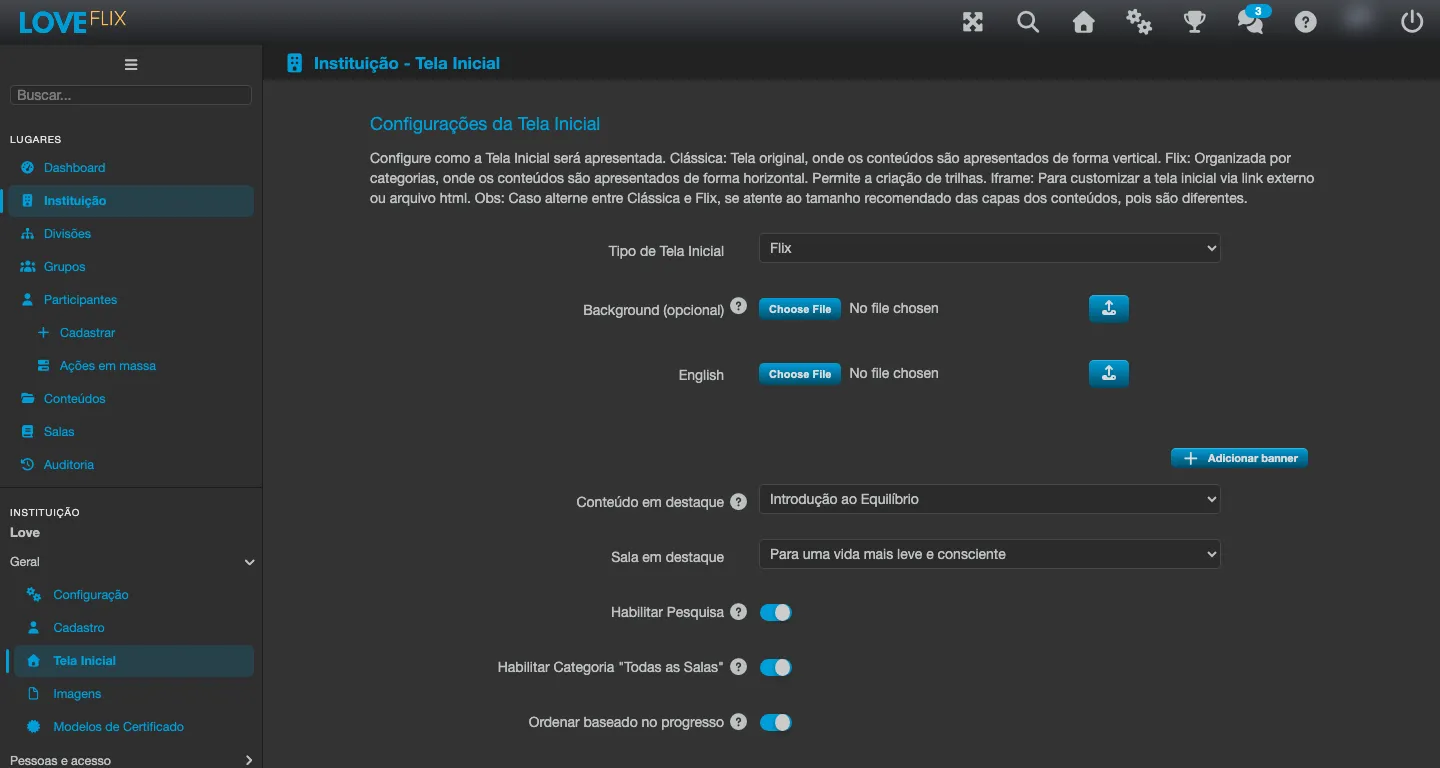
Layout styles
Section titled “Layout styles”The showcase can be displayed in three styles:
- Classic: a traditional catalog in a grid.
- Flix: categories in horizontal rows, navigation like the video streaming services. It is the only style that lets you organize the contents of a category into tracks (sequential progression, where the participant only moves on to the next content after completing the previous one).
- Iframe: displays an external page of your organization as the home screen - by URL or by uploading an HTML file.
Categories
Section titled “Categories”Contents are organized into named, ordered categories, which can be gathered into category groups (each group can have its own banner; a “Default” group is always shown for the categories that belong to no group):
- A class only appears in a category when the administrator explicitly assigns it - organizing the catalog is always your decision.
- Two categories exist automatically and cannot be renamed or deleted: All Classes (the public classes or those with enrollment open to everyone; it can be turned off with the Enable “All Classes” Category option in the home screen settings) and My List (each participant’s personal list, which anyone builds on their own).
- Categories can be reordered (up, down, first, last) and moved between groups.
- With the Show slider? option checked, the category’s content is shown in a single row with sliding controls on the sides, instead of a grid.
- A category can only be deleted after every class has been removed from it.