


Content creation on Eduvem
On Eduvem, content is the unit that brings together a course’s learning material: videos, documents, evaluations and other resources, organized in the order the participant should go through them.
What you can publish
Section titled “What you can publish”The platform accepts the most common learning material formats:
- Videos (including videos hosted on external services)
- Documents and presentations (PDF and images)
- SCORM packages produced in authoring tools
- Evaluations created on the platform itself
- Modular content assembled in Eduvem’s editor, combining text, media and assignments
Assembling a piece of content
Section titled “Assembling a piece of content”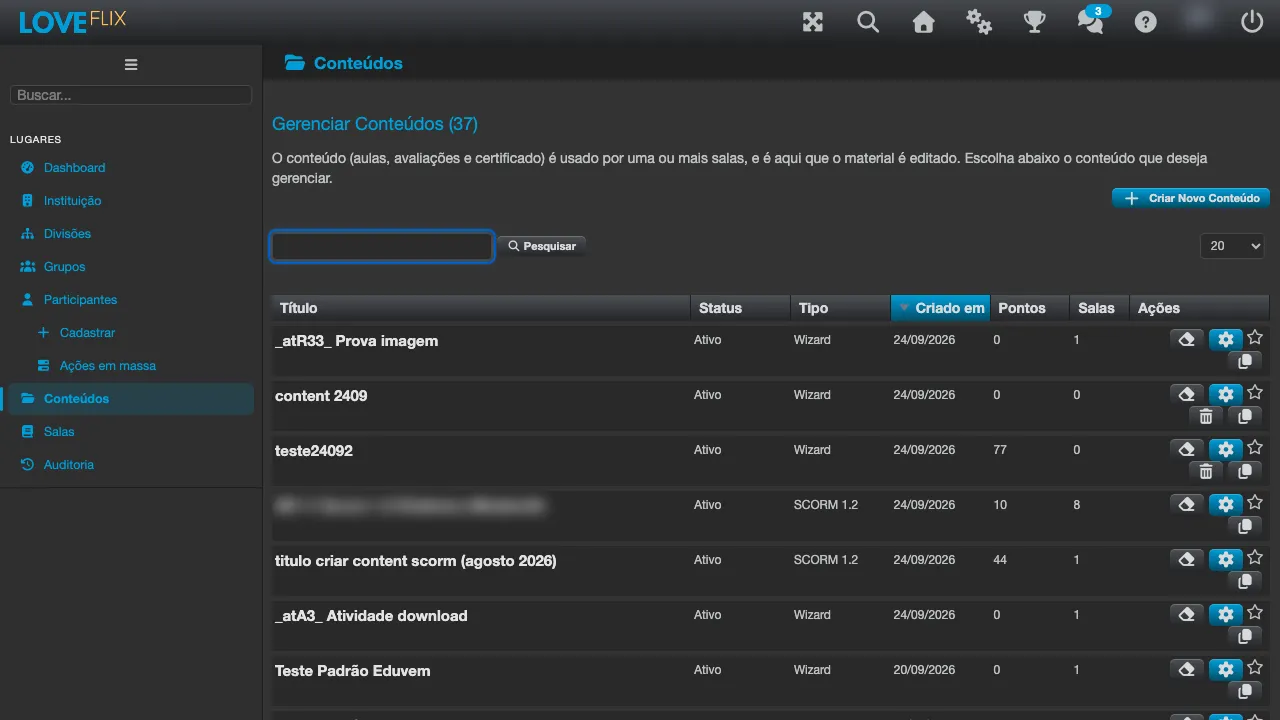
- Under Contents, in the admin console’s side menu, click Create New Content and give it a title, description and cover image - that is what appears on the showcase.
- Upload the material’s files to the content’s repository, or assemble the lectures in the modular content editor.
- Organize the items in the desired sequence and set the completion criteria (for example, an evaluation with a minimum score).
- Configure the certificate that will be issued on approval.
Publishing
Section titled “Publishing”The content reaches the participant through a class: create a class for the content and enroll people (or leave the class available on the showcase for direct enrollment, depending on your institution’s configuration). See Managing classes.