


Exporting NR trainings to SST systems
Companies that train teams in Regulatory Standards (NR) need to carry those trainings into the Occupational Health and Safety (SST) system they use, such as SOC, Senior or TOTVS. The NR trainings (SST) report gathers the completed NR trainings of a period in a spreadsheet with stable columns, ready to import, and includes the eSocial Tabela 28 code as a suggestion.
Generating the file
Section titled “Generating the file”- In Administration, Institution, open Reports.
- On the NR trainings (SST) row, choose the format: Generate in Excel format or Generate in CSV format.
- Choose the period in From [month] to [month]. Both months are included and both lists start at the current month; the start month must be earlier than or equal to the end month.
- Click Generate. The download starts right away.
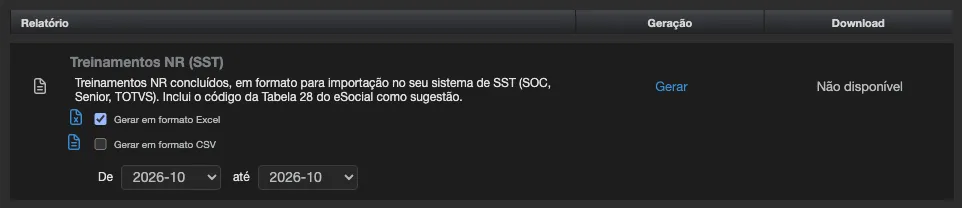
The file is named treinamentos-nr-<institution>-<start month>_<end month>, with the extension of the chosen format.
The period filters by the completion date, in the institution’s time zone. Only enrollments with an issued certificate are included: a certificate still withheld for missing data or signature (see NR certificates: place, modality and instructor) only appears once it is released.
The file
Section titled “The file”Excel produces two sheets: Treinamentos NR, with one row per training, and Resumo, with the export totals (records exported, anonymized people excluded, records without CPF, records without workload, records with a modality alert, records with a suggested Tabela 28 code, Tabela 28 layout version, period and generation date). Very large exports are automatically delivered as CSV.
CSV carries only the data, separated by semicolons, in UTF-8, to open directly in Brazilian Excel.
The headers and the column order are fixed, in Portuguese, so that the import into your system does not break from one month to the next. Dates come as dd/mm/yyyy and decimals use a comma.
Columns
Section titled “Columns”| Column | What it carries |
|---|---|
| ID do registro | Enrollment identifier |
| CPF | The person’s CPF, when registered |
| Nome | Participant’s name |
| Situação da pessoa | ativo (active) or inativo (inactive) |
| Situação da matrícula | matriculado (enrolled), cancelado (cancelled), suspenso (suspended) and the other enrollment statuses |
| Conteúdo | Content title |
| Sala | Class name |
| NR | NR number of the training |
| Origem da classificação NR | cadastro when the NR comes from the content field; titulo when it was read from the title |
| Data de início | Enrollment date |
| Data de conclusão | Date the certificate was issued |
| Carga horária (horas) | Workload, in hours. On an NR-35 certificate under the in-person NR-35 requirement, the confirmed in-person minutes, converted to hours |
| Nota | Assessment score, when there is one |
| Modalidade | In person, blended or distance, as set on the class or content |
| Instrutor | Instructor’s name |
| Qualificação do instrutor | Qualification entered |
| Responsável técnico | Name of the class’s technical manager |
| Código de verificação do certificado | The code that validates the certificate on the public page |
| Validade do certificado | Expiry date, when the content defines a validity |
| Código Tabela 28 sugerido (confirmação do empregador) | Suggested eSocial code |
| Alerta de modalidade | Prática presencial não comprovada (in-person practice not proven), when it applies |
| Regularizado em | Only on NR-35 certificates without the 480 confirmed in-person minutes: the date the person later completed an NR-35 class with those minutes (regularized on) |
The Tabela 28 code and the modality alert
Section titled “The Tabela 28 code and the modality alert”Eduvem only suggests a code for the NRs that have a direct code in Tabela 28: 1006 for NR-10 and 1207 for NR-12. For the other NRs the column is empty. The NR-10 code is an employer authorization, so the confirmation always belongs to the company. The layout version used, S-1.3 (cons. até NT 07/2026 rev.), is in the Resumo sheet and in the API response.
NR-10 and NR-12 require an in-person practical part, and NR-35 requires every training to be in person (item 35.4.5, Portaria MTE 1.259/2026). When the training for these NRs was delivered at a distance, or with no modality recorded, the row stays in the file and the Alerta de modalidade column shows Prática presencial não comprovada.
Who is left out and who appears with a status
Section titled “Who is left out and who appears with a status”- Anonymized people (deleted participants) are not in the file. Their total appears in the Resumo sheet; for them there are the retained NR certificates.
- Inactive or cancelled enrollments with a certificate appear in the list, with the status in the Situação da pessoa and Situação da matrícula columns. Filter those columns if your system should only receive active enrollments.
Classifying the content as NR
Section titled “Classifying the content as NR”The report only lists content that Eduvem recognizes as belonging to an NR. There are two ways:
- Field on the content. When editing the content, the NR trainings group carries the NR (Regulatory Standard) field, with the list of NRs in force (for example, “NR-35 - Trabalho em altura”) and the Not NR content option. The field is shown to institution administrators when the feature is enabled, including on content received through distribution, which the institution classifies on its own copy.
- Content title. With the field empty, the NR is read from the title: “NR-35”, “NR 35” or “NR35” are enough. If the title mentions more than one NR, the first valid one counts.
With the field empty, it shows a hint of what the title resolves to: Empty: will be identified from the title as NR-35. When the title names no NR, the hint says Empty: the title names no NR; not in the export.
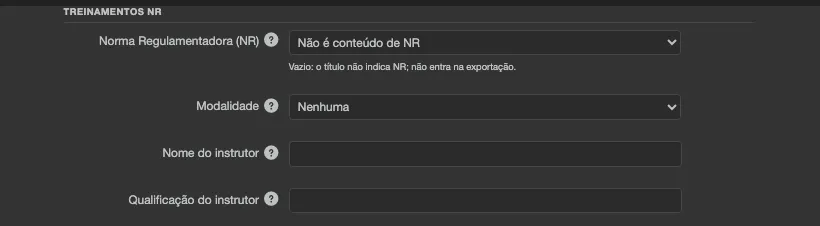
Fill in the field for content whose title does not name the NR clearly. The Origem da classificação NR column shows, on each row, where the NR came from.
Through the integration API
Section titled “Through the integration API”Systems that fetch this data automatically, without downloading spreadsheets, use the NR trainings endpoint of the integration API. See API documentation.
See also
Section titled “See also”- NR certificates: place, modality and instructor - the place, modality and instructor data that feed the file’s columns.
- NR certificates with dual digital signature - the signature that releases the certificate.
- Retained NR certificates - what the institution keeps from deleted participants.
- Generating reports